In your Account, there is an opportunity to review your progress. It will provide you a percentage of the program completed and a list of any milestones (quizzes, assignments etc) for your registered program. Also, upon completion you will be provided the opportunity to download your certificate.
Please use the grey button with an arrow to the far right to expand and collapse the program details. This is located to the right of the ‘In Progress’.
Program – Collapsed View

Program – Expanded View

How do I check my quiz scores and see what I got wrong?
Once you expand your course using the grey arrow above, you’ll see more detail beyond your overall completion percentage:
- Program Progress — shows the percentage of the course you’ve completed and how many steps you’ve finished (for example, “28% Complete, 37/129 Steps”).
- Quiz Stats — below your Program Progress, you’ll see a list of each quiz you’ve taken, along with your Score and the Date you took it.
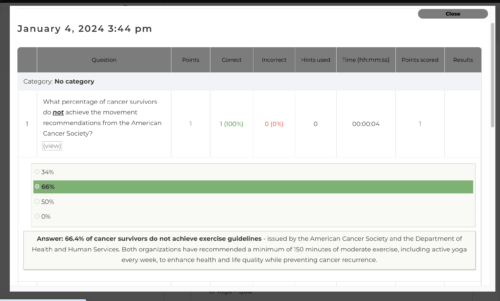
- Reviewing your answers — for some quizzes, the Statistics column includes a (view) link. Click it to see the specific questions and answer choices from that quiz, including what you selected and what the correct answer was.
Not every quiz has the (view) option — that depends on how the individual quiz was set up.